
Your assistant's plan,
on your Garmin Edge.
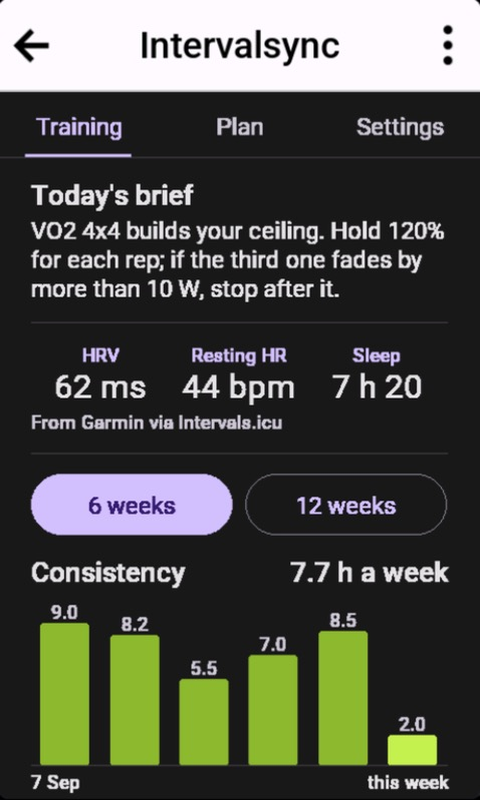
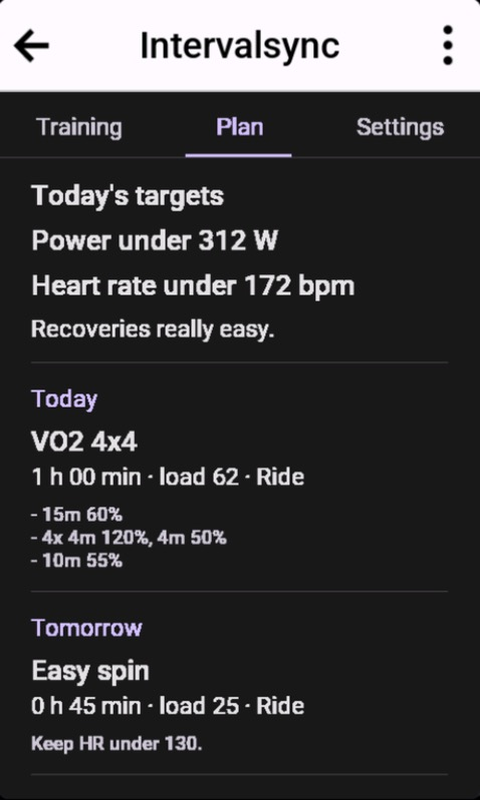
IntervalSync for Garmin Edge is in Garmin's Connect IQ store. It is a head unit companion to the assistant you already talk to about your training. The conversation stays where it is, in Claude, ChatGPT or whichever assistant you use, and the Edge on your stem shows what came out of it: today's brief, today's power and heart rate limits, the workouts ahead, and how your recent rides went.
It runs on the Edge 1030, 1030 Plus, 1030 Bontrager, 1040, 1050, 1060 and 850. It costs nothing to install and works on every IntervalSync plan, Free included.
A companion, not another coach
Most apps for a head unit bring a plan and advice of their own. This one brings neither. IntervalSync connects your Intervals.icu training to your own AI assistant, and the Edge app is where that assistant's words meet the ride. What you and your assistant settle the night before, what tomorrow's session is for, where to cap the efforts, when to stop early, is on the bar mount when you clip in. You don't have to open a chat on your phone at the side of the road to find it.
What's on the Edge
- Training. Today's brief, with the name of the assistant that saved it. Today's HRV, resting heart rate and sleep from Intervals.icu. Your hours a week over 6 or 12 weeks, with your critical power and W′ trends. Your rides from the last 30 days, each with its average power, best 5 and 20 minutes, and lowest W′ balance.
- Plan. Today's power and heart rate limits, with a note if there is one, then your planned workouts for the next 7 days, each with its description.
- Settings. Your connection, with Sync now and Disconnect. Your coach and team spaces, each opening to its brief and latest updates. Your IntervalSync plan.
Four things to ask your assistant
Once your Edge is paired, your assistant can save a brief, limits or a comment for it, when you ask. A brief and limits are for one date, and the Edge shows them on that date only.
1. Put tomorrow's brief on the bike
Tomorrow is the VO2 4x4. Put a short brief on my Edge: what the session is for, and when to stop early.
2. Cap today's ride
Keep today's ride under 312 W and 172 bpm, and add a note to keep the recoveries really easy.
3. Plan the week, then find it on the Plan tab
Workouts your assistant adds to your Intervals.icu calendar show on the Plan tab with the rest. Adding them comes with the full-access trial and with Pro; the brief and limits work on every plan.
Plan next week around a long ride on Saturday and an easy Monday, and put Saturday's brief on my Edge.
4. Look back, then set tomorrow
How did this morning's ride go against the plan? Based on that, what should tomorrow's brief say? Show me before you save it.
Pairing it
- Install it. Find IntervalSync in the Connect IQ app on your phone, or on Garmin's store page, and sync your Edge.
- Get six digits. On the Edge, open IntervalSync, go to Settings and tap Connect to IntervalSync. Keep the app open.
- Enter them. Sign in at intervalsync.icu, open Devices, and type the digits in within 10 minutes.
The Edge gets a token of its own. It is never given your Intervals.icu sign-in or your assistant's, and you can remove it from the same Devices page. An account can pair up to 10 devices.
On each plan
Devices work on every plan. On Free, your devices read your ride settings once a UTC day between them, and the reads you open on the device share your assistant's daily allowance for the same data. In the trial and on Pro, each device reads its settings up to 12 times a day.
What it does not do
- It does not load workouts onto the Edge. Planned workouts reach your Edge's own workout player the way they already do, from Intervals.icu through Garmin Connect. The Plan tab shows them next to the brief.
- It shows today's limits; it does not watch them. The app does not follow your power or heart rate during the ride.
- It reads through your phone. The Edge updates over Bluetooth through Garmin Connect. Without the phone, it shows what it last saved and says so.
- It is not a coach. It has no plan or advice of its own. The brief is what you and your assistant wrote.
Garmin, Edge and Connect IQ are trademarks of Garmin. IntervalSync is an independent service and is not affiliated with, endorsed by, or sponsored by Garmin.
IntervalSync in the Connect IQ store · Every tool your assistant can use · All articles · Connect your training